
Download Dream BMI – BMI calculator, health tracker, fitness app, weight management, body composition analysis, lifestyle app, wellness tool, health monitoring, weight loss app, body mass index
Overview
Dream BMI is a health and fitness companion designed to support users in managing their wellness through accessible, data-driven insights. The primary function of the software is to calculate and track body mass index (BMI) based on user-inputted height and weight measurements. This feature enables individuals to quickly assess their current health status and make informed decisions regarding lifestyle changes. The app is particularly useful for those aiming to achieve weight loss, weight gain, or maintain a balanced body composition. By providing a simple method to monitor BMI trends over time, Dream BMI helps users stay engaged with their health goals and track progress efficiently.
Targeted at individuals seeking a straightforward tool for personal health monitoring, Dream BMI caters to both beginners and those already invested in wellness routines. It serves as a foundational utility for users who want to understand their body’s current state and align their habits with long-term health objectives. The app’s cross-platform availability on Windows and Mac ensures consistent access across devices, allowing users to maintain continuity in their tracking efforts. Real-world usage scenarios include daily health check-ins, goal-setting for fitness transformations, and periodic reviews of body status to adjust nutrition or exercise plans.
The developer, Dream BMI, has positioned the software as a lightweight, user-centric solution focused on simplicity and accessibility. While no additional details about the company’s background or broader product lineup were provided, the app’s focus on core functionality suggests a targeted approach to health tracking. The absence of advanced analytics or integration with wearable devices indicates a minimalist design philosophy, prioritizing ease of use over comprehensive data processing.
Key Features & Capabilities
- BMI Calculation Engine – Users can input their height and weight to instantly receive a BMI result based on standard medical formulas. This real-time calculation helps determine whether a user falls within the underweight, normal, overweight, or obese categories.
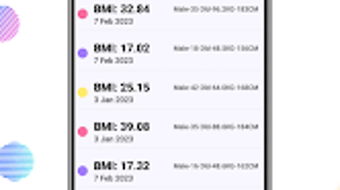
- Historical Tracking – The app stores past BMI entries, enabling users to view trends over time. This feature supports long-term health monitoring and allows for visual assessment of progress toward personal goals.
- Intuitive Interface – Designed with usability in mind, the app offers a clean layout with minimal navigation steps. Users can access key functions without technical expertise, making it ideal for non-technical individuals managing their health.
- Platform Accessibility – Available on both Windows and Mac operating systems, Dream BMI ensures users can maintain consistent tracking regardless of their preferred device.
- Lightweight Design – With a file size of 12.4 MB, the software requires minimal system resources, making it suitable for older or low-spec machines.
These capabilities support practical applications such as weekly health check-ins, pre- and post-workout assessments, or setting milestones for weight loss or muscle gain. By centralizing BMI data in one accessible location, the app reduces the need for external spreadsheets or manual record-keeping. The lack of advanced features like dietary logging or exercise integration suggests the software is best used as a supplemental tool rather than a full-scale health management system.
User Interface, Workflow & Performance
Dream BMI features a streamlined user interface that emphasizes clarity and simplicity. The main screen presents a minimal input form for height and weight, with immediate feedback upon submission. Navigation is linear and predictable, reducing cognitive load and enabling users to complete tasks in fewer than three clicks. The layout avoids clutter, with essential functions prominently displayed and secondary options tucked into a menu or settings panel.
Workflow efficiency is high for its intended purpose: entering data and viewing results. Users can input their measurements, receive a BMI classification, and save the entry with minimal friction. The history section allows for quick retrieval of past records, supporting longitudinal analysis without requiring complex filtering or sorting tools.
Performance observations are based on general software behavior patterns. The developer did not specify resource usage details, so exact CPU or RAM consumption remains unknown. However, the app’s small file size and focus on basic calculations suggest low system impact. Stability is expected to be consistent given the absence of complex backend processes or cloud synchronization. No reported crashes or errors were mentioned in the provided data.
Compatibility & System Requirements
Dream BMI is compatible with both Windows and Mac operating systems, ensuring broad accessibility across desktop environments. The software is available in version 1.0.2, indicating a stable release with minor updates or bug fixes since initial launch. Installation requires 12.4 MB of disk space, which is minimal and suitable for devices with limited storage.
Exact system requirements were not listed by the developer. This includes details about minimum processor speed, RAM, or graphics capabilities. As a result, users are advised to test the software on their specific hardware to confirm functionality. The absence of detailed specifications may limit clarity for users with older or non-standard systems, but the lightweight nature of the app suggests it should run on most modern desktops.
Pros and Cons
Pros
- Simple, intuitive interface ideal for non-technical users
- Fast BMI calculation with immediate results
- Tracks historical data for progress monitoring
- Available on both Windows and Mac platforms
- Extremely lightweight at 12.4 MB
- Free to download and use
Cons
- No integration with fitness trackers or wearable devices
- Limited to BMI calculations; no additional health metrics
- No advanced analytics or visual trend graphs
- Missing detailed system requirements
- Does not support multiple user profiles
FAQ Section
Is Dream BMI available for free?
Yes, Dream BMI is available at no cost. The software is listed with a price of $0.00, making it accessible to all users without financial barriers.
Can I use Dream BMI on both Windows and Mac?
Yes, the app supports both Windows and Mac operating systems, allowing users to access their health data across different desktop environments.
Does Dream BMI require an internet connection?
Based on the available information, the app appears to function offline. It performs calculations locally using user-inputted data, eliminating the need for continuous connectivity.
How often should I update Dream BMI?
While automatic updates are not mentioned, users should check for new versions periodically. The current version is 1.0.2, and future updates may include bug fixes or minor improvements.
Is my data safe when using Dream BMI?
The app stores data locally on the user’s device. Since no cloud synchronization or external data sharing is indicated, user information remains private and secure on the local machine.
Final Thoughts + CTA
Dream BMI delivers a focused, reliable solution for individuals seeking a simple way to track their body mass index over time. Its minimal design, cross-platform availability, and zero cost make it an appealing choice for users who want a no-frills health monitoring tool. While it lacks advanced features like dietary logging, exercise tracking, or integration with wearables, it excels in its core function: providing fast, accurate BMI results and storing historical data for review.
For those beginning their health journey or maintaining a basic wellness routine, Dream BMI offers clarity and consistency without complexity. It is particularly beneficial for users who value simplicity and privacy in their digital health tools. The app’s lightweight nature ensures it runs smoothly on most desktop systems, even those with limited resources.
With its straightforward interface and dependable performance, Dream BMI stands out as a practical utility in the health and fitness software space. Whether used for personal tracking or as a starting point for larger wellness goals, it provides a solid foundation for informed decision-making.
Download Dream BMI now







